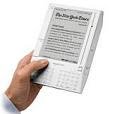
 LARGER versions of the pics below are at my PBase photos site.
 Essentially, the first 3 below are photo comparisons of my new Kindle 3, a white, not graphite one -- am I the first? :-)
The others show, at the New York Times:
. the Home page in vertical and horizontal modes with the new Webkit-based web browser and then a sequence of:
. zooming-in for options and choosing an article, and
. getting that article in Article Mode.
I took many more, so I'll be updating that photo site.
Reminder: You can (1) click here to see the page of larger versions of the shots below, or
(2) click on a photo to get the larger one.
SCREEN CONTRAST: Kindle 3 vs Kindle 2
 Kindle 3 and Kindle 2 with same screen-sleeper |
 Kindle 3's Birds screen-sleeper |
 Kindle 2's Birds screen-sleeper |
BROWSING WITH KINDLE 3 at The New York Times
 New York Times Home Page in Landscape mode |
 Portrait, w/ zoom-in box showing |  Zoomed-in area Zoomed-in area |
 Chosen article. selecting Article Mode. |  Article Mode version |
Hope some of that helped!
ADDENDUM - an older photo of the Kindle 2 screen image
 Here, for commenter Anonymous who felt the K2 solo or close-up image was "just too poor" to be believed, is a smaller-sized version of the picture I took of the Kindle-2 birds screen-sleeper 1-1/2 years ago when I just enjoyed the image as it was.
Note how close that is to the picture a week ago. The Kindle 3 contrast is so much better, it makes the Kindle 2 image look "just too poor" for the commenter. That older image is at the old Kindle-1 and Kindle-2 comparison page and was taken back in Feb. '09, which seems eons ago in this digital world.
Kindle 3 (UK: Kindle 3), DX Graphite
Check often: Temporarily-free late-listed non-classics or recently published ones
Guide to finding Free Kindle books and Sources. Top 100 free bestsellers.
Also, UK customers should see the UK store's Top 100 free bestsellers.